Scamadviser Review Check Website Safety Easily
Published: 25 Mar 2026
Have you ever visited a website and felt unsure if it was safe? You are not alone. Many people face this problem every day. Online scams are growing fast, and it is easy to fall into a trap if you are not careful.
This is where Scamadviser becomes very helpful. It is a simple tool that checks if a website is safe or risky. Many beginners do not know how to verify websites before using them. This can lead to losing money or personal data.
For example, imagine you find an online store with very low prices. You feel excited and want to buy quickly. But later, you realize the website was fake. This happens often.
So, how can you avoid this problem? The answer is simple-use Scamadviser before trusting any website.
In this guide, you will learn everything step by step. You will understand what Scamadviser is, how it works, and how to use it smartly. Ready to stay safe online? Let’s begin.
What is Scamadviser?
Scamadviser is an online tool that helps users check if a website is safe or not. It analyzes many factors like domain age, user reviews, and website activity. Then, it gives a trust score. This score helps users decide if they should trust the site.
For beginners, this tool is very useful. You just enter a website URL, and Scamadviser shows results in seconds. It works like a safety checker for the internet.
For example, if you want to buy a product from a new website, you can check it on Scamadviser first. If the score is low, you should be careful. If the score is high, the website is likely safe.
This tool does not guarantee safety, but it gives strong guidance. It helps you make better decisions online. Think of it like checking reviews before buying a product.
Key Features of Scamadviser
Scamadviser offers simple but powerful features.
Features List
- Website Trust Score
It shows a score based on safety checks.
Example: A site with 90% score is likely safe.
This helps users decide quickly. - Domain Age Check
It shows how old the website is.
Example: New sites may be risky.
Older sites are often more trusted. - User Reviews Section
People share their experiences.
Example: Users warn about scams.
This gives real feedback. - Technical Analysis
It checks server and location data.
Example: Hidden owner details may be risky.
This adds another safety layer.
You may also Like these posts
Tech on Dicas Simple Tech Tips to Simplify Your Life
Skibidi Tech Install Third-Party Apps on iOS Safely
Telemetry in Firefox: A Simple Guide for Users
Why Scamadviser Matters
Scamadviser is important because online scams are increasing every day. Many fake websites look real, and beginners cannot tell the difference. This tool helps you stay safe and avoid common traps.
When you use Scamadviser, you get clear signals about a website. This saves time and reduces risk. Without checking, you may trust a harmful site.
For example, many people order products from fake stores. They pay money but never receive items. If they had checked Scamadviser, they could avoid this problem.
Also, it helps protect personal data. Some websites steal information like emails or passwords. Scamadviser warns you before that happens.
In simple words, it acts like a safety guard for your online activity. It gives you confidence and control.
Main Benefits of Using Scamadviser
Understanding its benefits helps you use it better.
Benefits List
- Avoid Online Scams
It helps you detect fake sites.
Example: Avoid a fake shopping site.
This saves money. - Protect Personal Data
It warns about risky platforms.
Example: Avoid entering email on unsafe sites.
This keeps your data safe. - Make Smart Decisions
You act based on facts.
Example: Check before buying.
This improves choices. - Save Time
Quick results in seconds.
Example: No need for long research.
This makes life easier.
Key Features and Types of Scamadviser
Scamadviser offers different types of checks and features. These help users understand website safety in detail. Each feature plays a role in building trust.
Some features focus on technical data. Others focus on user feedback. Together, they give a complete picture.
For example, a site may look safe technically but have bad user reviews. In that case, you should be careful.
Understanding these types helps you read results correctly.
Feature Type 1: Automated Risk Analysis
This feature uses data to check websites.
Details
- Algorithm-Based Score
It calculates trust using data.
Example: Based on traffic and age.
This gives quick results. - Server Location Check
Shows where the site is hosted.
Example: High-risk countries may warn users.
This adds awareness. - Security Signals
Checks HTTPS and safety.
Example: Secure lock icon.
This shows protection level.
Feature Type 2: Community Feedback System
This feature uses real user input.
Details
- User Reviews
People share experiences.
Example: Report scams.
This adds real insight. - Ratings System
Users rate websites.
Example: Low ratings warn others.
This builds trust. - Discussion Section
Users talk about issues.
Example: Sharing problems.
This helps new users.
How to Use Scamadviser (Step-by-Step Guide)
Using Scamadviser is simple and fast. Anyone can use it without technical knowledge. You just need a website link.
First, go to the Scamadviser website. Then, enter the URL you want to check. Within seconds, you will see the results.
For example, if you want to buy from a new store, check it first. This simple step can save you from scams.
Following steps helps you use it correctly.
Step-by-Step Process
Steps
- Step 1: Visit Scamadviser Website
Open the official site.
Example: Use your browser.
This is the starting point. - Step 2: Enter Website URL
Paste the link you want to check.
Example: Online store link.
This begins analysis. - Step 3: Check Trust Score
Look at the score result.
Example: High score is safer.
This guides decisions. - Step 4: Read Reviews and Details
Check user feedback.
Example: Look for warnings.
This adds clarity.
Benefits of Using Scamadviser
Using Scamadviser regularly can improve your online safety. It gives you control over your digital actions. Instead of guessing, you rely on real data.
For beginners, this tool is like a safety shield. It reduces risk and builds confidence.
For example, before signing up on a new website, you can check it. This helps avoid fake platforms.
Also, it supports safe online shopping. Many users rely on it before making purchases.
Core Advantages
Key Benefits
- Confidence in Online Activity
You feel secure while browsing.
Example: Safe shopping decisions.
This builds trust. - Better Awareness
You learn about risks.
Example: Spot fake websites.
This improves knowledge. - Quick Decision Making
Instant results help fast action.
Example: Avoid unsafe links.
Saves effort. - User-Friendly Tool
Easy for beginners.
Example: Simple interface.
No technical skills needed.
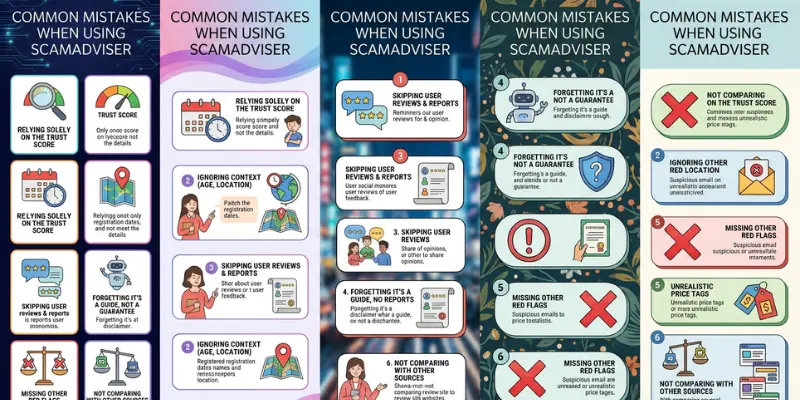
Common Mistakes When Using Scamadviser
Many users make simple mistakes while using Scamadviser. These mistakes reduce its effectiveness.
Some people trust the score blindly. Others ignore user reviews. Both actions can lead to poor decisions.
For example, a site may have a good score but bad reviews. Ignoring reviews can be risky.
Understanding these mistakes helps you use the tool better.
Mistakes Users Make
Mistakes List
- Ignoring Reviews
Only checking score.
Example: Missing warning signs.
Leads to risk. - Blind Trust in Score
Not analyzing details.
Example: High score but fake reviews.
Can mislead. - Checking Only Once
Not rechecking later.
Example: Site changes over time.
Miss updates. - Using Fake URLs
Entering wrong links.
Example: Typo errors.
Gives wrong results.
Tips and Best Practices for Scamadviser
To get the best results from Scamadviser, you should follow smart practices. These tips help you stay safe and make better decisions online.
Always combine Scamadviser with your own judgment. Do not rely on one tool only. Think and verify before acting.
For example, if something feels too good to be true, it probably is.
Practical Tips
Action Steps
- Check Multiple Factors
Look at score and reviews.
Example: Combine both insights.
Gives full picture. - Avoid New Suspicious Sites
Be careful with new domains.
Example: Recently created sites.
Higher risk. - Use Secure Payment Methods
Protect your money.
Example: Trusted payment apps.
Adds safety. - Stay Updated
Learn about new scams.
Example: Read online guides.
Improves awareness.
Business and Practical Use of Scamadviser
Scamadviser is not just for personal use. It also helps businesses and professionals. Many companies use it to check partners or competitors.
For example, a business owner may verify a supplier before working with them. This reduces risk.
Content creators also use it to review websites. This helps them create useful content for readers.
Real-World Use
Use Cases
- Business Verification
Check partners before deals.
Example: Supplier verification.
Reduces fraud. - Content Creation
Writing reviews.
Example: Blog articles.
Drives traffic. - Customer Safety Checks
Protect users.
Example: Recommend safe sites.
Builds trust.
Maintenance and Improvement When Using Scamadviser
Improving your use of Scamadviser helps you stay safe long-term. You should learn from each experience and adjust your approach.
Keep checking new websites regularly. Do not rely on old data. Online risks change quickly.
For example, a safe site today may become risky later.
Improvement Tips
Actions
- Recheck Websites
Verify again before use.
Example: Before payments.
Ensures safety. - Learn from Mistakes
Improve decisions.
Example: Avoid past errors.
Builds experience. - Stay Alert
Watch for warning signs.
Example: Fake offers.
Keeps you safe.
Future Trends of Scamadviser
The future of Scamadviser looks strong. As online scams grow, tools like this will become more advanced.
New technologies like AI (smart systems) will improve accuracy. This will help users detect scams faster.
For example, future tools may give real-time alerts.
Also, mobile usage will increase. More users will check websites on their phones.
Trends
Examples
- AI-Based Detection
Smarter analysis tools.
Example: Faster results.
Improves accuracy. - Mobile Optimization
Better mobile experience.
Example: App features.
Easier access. - Real-Time Alerts
Instant warnings.
Example: Scam notifications.
Saves users.
Frequently Asked Questions About Scamadviser
Quick answers based on what people often search on Google.
Scamadviser is a legit website safety checker.
Example: It uses data and user reviews to rate sites.
This helps users spot risky websites.
It analyzes domain age, traffic, and user feedback.
Example: New sites with low trust get low scores.
This shows risk level.
Yes, but do not rely only on the score.
Example: Always read reviews too.
This gives better understanding.
A score above 80% is usually safe.
Example: Higher score means lower risk.
This helps quick decisions.
Sometimes data is limited or new.
Example: New websites often get low trust.
This does not always mean scam.
Yes, it is safe and does not harm your device.
Example: You only enter a website link.
This keeps your data secure.
Avoid using the website or check more details.
Example: Look for reviews or alternatives.
This reduces risk.
Conclusion
Scamadviser is a powerful and simple tool for anyone who wants to stay safe online. It helps you check websites, avoid scams, and protect your personal data. In today’s digital world, this is very important.
This guide explained everything in a beginner-friendly way. You learned what Scamadviser is, why it matters, how to use it, and how to avoid mistakes.
Always remember one thing: do not trust any website without checking it first. A small step like using Scamadviser can save you from big problems.
For example, before buying anything online, take a few seconds to check the site. This habit can protect your money and your data.
Now it’s your turn.
Will you start using Scamadviser before trusting any website online?
You may also Like these posts
Web Digital Secrets: Transform Your Business Fast
Banca Web Pichincha: Simplifying Your Online Banking
West Palm Beach Web Design for Local Businesses





- Be Respectful
- Stay Relevant
- Stay Positive
- True Feedback
- Encourage Discussion
- Avoid Spamming
- No Fake News
- Don't Copy-Paste
- No Personal Attacks
- Be Respectful
- Stay Relevant
- Stay Positive
- True Feedback
- Encourage Discussion
- Avoid Spamming
- No Fake News
- Don't Copy-Paste
- No Personal Attacks
