Cloud Firewalls: Protect Your Website from Hackers Fast
Published: 17 Feb 2026
Building a website or app takes a lot of time, effort, and passion. Every page, every feature, and every detail is your creation. But the internet is full of risks. Hackers, viruses, and attacks can destroy everything in seconds. The fear of losing your hard work is real, and it can keep you awake at night, wondering if your website or app is truly safe.
Cloud firewalls protect your digital space and keep your data safe, so you can focus on growing your website or business without worry.
What is a Cloud Firewall?
A cloud firewall is a security tool that protects your websites, apps, and cloud servers from online attacks. It monitors incoming and outgoing traffic and blocks anything suspicious. Think of it like a security guard standing at the entrance of a building, checking everyone before they come in. Cloud firewalls are easy to manage, update automatically, and grow with your website or business.
Why Cloud Firewalls Matter
- Protects your data from hackers and malware.
- Stops unauthorized access to websites and cloud servers.
- Reduces the risk of downtime caused by attacks.
- Gives you peace of mind so you can focus on building your website or business.
Purpose of This Article
- Explain different types of cloud firewalls.
- Show the benefits of using a cloud firewall.
- Guide readers on how to set up and manage a firewall.
- Provide tips to maximize security and performance.
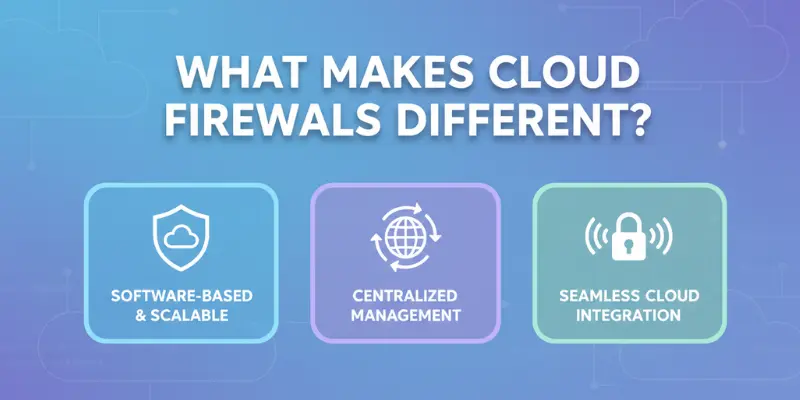
What Makes Cloud Firewalls Different
Cloud firewalls work differently from traditional firewalls. While traditional firewalls rely on hardware and manual updates, cloud firewalls are managed online and update automatically. They are flexible, easy to scale, and can protect multiple servers or apps at the same time. Think of a cloud firewall like a smart home security system that adjusts itself and keeps your house safe without you needing to do much.
Traditional vs Cloud Firewalls
- Traditional Firewalls: Physical devices, need manual setup, protect specific networks only.
- Cloud Firewalls: Managed online, update automatically, protect multiple locations and apps.
- Key Difference: Cloud firewalls are faster to deploy and easier to manage for growing websites and businesses.
Key Features of Cloud Firewalls
- Automatic Updates: Always stay protected from new threats without manual work.
- Scalability: Grow your firewall as your website or app grows.
- Remote Management: Control security settings from anywhere.
- Traffic Monitoring: Watch incoming and outgoing traffic in real time.
- Custom Rules: Set rules for allowed or blocked traffic easily.
Real-Life Example
- A small e-commerce website using a cloud firewall can automatically block suspicious users worldwide while letting genuine customers shop without interruptions.
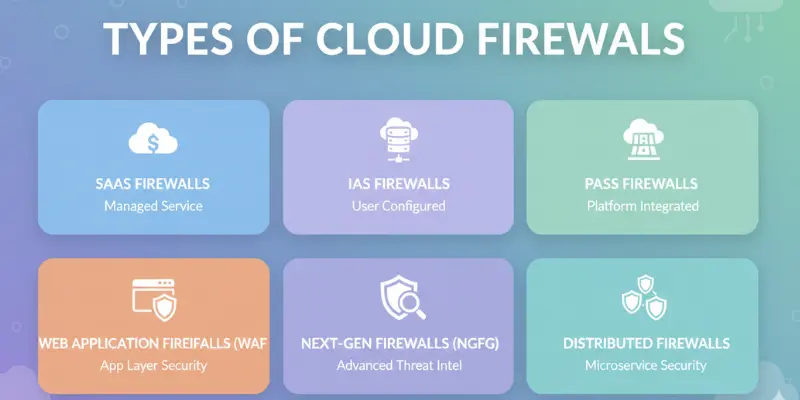
Types of Cloud Firewalls
Cloud firewalls come in different types to suit various needs. Each type protects your website, app, or server in a specific way. Choosing the right type depends on your traffic, security needs, and business size. Understanding the differences helps you set up better protection and avoid gaps in security.
Network-Based Cloud Firewalls
- Purpose: Protect traffic between your servers and the internet.
- How it Works: Monitors incoming and outgoing data, blocking harmful traffic before it reaches your server.
- Example: Stops malicious IPs or automated attacks from reaching your website.
- Best For: Businesses that need to secure multiple servers or networks.
Application-Based Cloud Firewalls (WAFs)
- Purpose: Protect websites and web applications from attacks.
- How it Works: Focuses on traffic targeting apps, such as login forms or payment pages.
- Example: Blocks hackers trying to steal user login details or inject malware into forms.
- Best For: Websites with user accounts, e-commerce stores, or apps handling sensitive data.
Hybrid Firewalls
- Purpose: Combines network and application firewall features.
- How it Works: Monitors both server traffic and app-level requests for threats.
- Example: Protects a cloud-based e-commerce platform from network attacks and targeted login attacks.
- Tip: Ideal for businesses with complex setups or multiple cloud services.
Benefits of Using Cloud Firewalls
Cloud firewalls offer strong protection for websites, apps, and cloud servers. They help prevent attacks, reduce risks, and make security easier to manage. Unlike traditional firewalls, cloud firewalls are flexible, cost-effective, and grow with your business. Using them ensures your data and users stay safe while giving you more control and peace of mind.
Improved Security
- Stops Malware and Hacks: Blocks viruses, ransomware, and unauthorized access.
- Monitors Traffic: Detects suspicious activity in real time.
- Example: An e-commerce site can prevent credit card theft attempts automatically.
Easy Management
- Remote Access: Control firewall settings from anywhere.
- No Physical Devices Needed: Works entirely online, no hardware setup.
- Example: Adjust rules from your laptop while traveling or working remotely.
Scalability
- Grows with Your Business: Handles more users, apps, or servers as needed.
- Flexible Resources: Easily adapts to traffic spikes or new projects.
- Example: A blog with increasing visitors won’t slow down due to firewall limits.
Cost-Effectiveness
- Saves Money: No expensive hardware or on-site installation needed.
- Pay-As-You-Go: Many providers offer plans based on usage.
- Example: A startup can get enterprise-level security without high upfront costs.
How Cloud Firewalls Work
Cloud firewalls protect your website, app, or server by actively monitoring traffic and blocking threats before they reach your system. They act like a digital gatekeeper, checking all incoming and outgoing data, alerting you about suspicious activity, and letting you control what is allowed. This makes managing security easier, safer, and more efficient for any website or business.
Traffic Filtering
- Blocks Harmful Traffic: Stops hackers, malware, and unwanted bots from accessing your system.
- Allows Safe Traffic: Ensures genuine users and requests pass through without interruption.
- Example: A blog receives thousands of visits daily, but harmful bot traffic is blocked automatically.
Monitoring and Alerts
- Real-Time Notifications: Sends alerts when suspicious activity is detected.
- Continuous Surveillance: Keeps an eye on your servers or applications 24/7.
- Example: An online store receives a notification when multiple failed login attempts occur.
Rule Setting
- Custom Rules: Users can define which traffic is allowed or blocked.
- Easy Management: Rules can be updated anytime to match changing security needs.
- Example: Only trusted IPs can access your admin panel, while all other requests are blocked.
Visualization Example
- Imagine incoming traffic like cars approaching a gate. The cloud firewall checks each car, lets safe ones through, and turns harmful ones away.
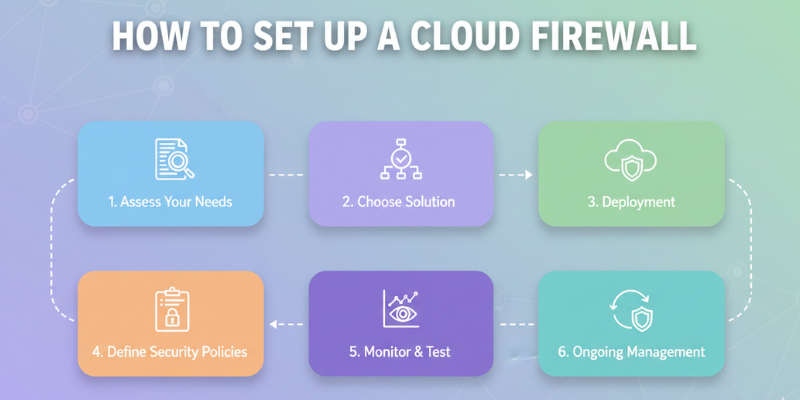
How to Set Up a Cloud Firewall
Setting up a cloud firewall is easier than many people think. You just need to choose the right provider, configure basic security rules, monitor activity, and update settings as your website or app grows. Following a clear setup process ensures your system stays protected without needing advanced technical skills.
Step 1: Choose a Cloud Firewall Provider
- Popular Options: AWS, Google Cloud, Cloudflare.
- Consider Features: Look for automatic updates, ease of use, and cost.
- Example: Cloudflare is ideal for small to medium websites, while AWS works well for larger businesses.
Step 2: Configure Security Rules
- Allow Trusted IPs: Ensure your team can access the system safely.
- Block Suspicious Requests: Stop unknown or harmful traffic automatically.
- Tip: Start with default rules and adjust gradually as you learn what traffic is safe.
Step 3: Monitor Activity
- Check the Dashboard Regularly: Watch for alerts and unusual traffic.
- Set Notifications: Get instant updates for potential threats.
- Example: A website owner receives a notification when multiple failed login attempts occur.
Step 4: Update Rules When Needed
- Keep Settings Current: Add new trusted IPs or block new threats.
- Adapt to Changes: Adjust firewall rules when your website grows or traffic patterns change.
- Tip: Review firewall rules at least once a month to ensure strong protection.
Common Mistakes to Avoid
Even with a cloud firewall, many website and app owners make simple mistakes that reduce protection. Ignoring updates, alerts, or weak settings can leave your system vulnerable. Understanding these common pitfalls helps you stay fully protected and get the most out of your firewall.
Not Updating Firewall Rules Regularly
- Why It Matters: Threats change constantly, and outdated rules can miss new attacks.
- Tip: Review and update rules at least once a month.
- Example: A blog that never updates its firewall could be exposed to new malware attacks.
Ignoring Alerts or Logs
- Why It Matters: Alerts show suspicious activity that needs attention.
- Tip: Check dashboards daily or set instant notifications.
- Example: A small online store blocked a hacker attempt because the owner noticed repeated login failures from an unknown IP.
Using Weak Passwords for Cloud Accounts
- Why It Matters: Even a strong firewall can’t protect accounts with weak passwords.
- Tip: Use long, unique passwords and enable two-factor authentication.
- Example: Admin accounts with simple passwords can be hacked, giving attackers access despite a firewall.
Assuming a Firewall is Enough
- Why It Matters: Firewalls are powerful but not complete protection.
- Tip: Combine firewalls with antivirus, backups, and secure coding practices.
- Example: A startup used a firewall but also added malware scanning and backups to fully protect its website.
Real-Life Examples of Cloud Firewalls
Cloud firewalls are not just technical tools; they solve real problems for businesses of all sizes. Many small and medium websites use them to prevent attacks, protect user data, and save costs compared to traditional hardware firewalls. Seeing how businesses apply cloud firewalls can help you understand their value and how to implement them effectively.
Example 1: Small E-Commerce Business
- Scenario: A small online store faced repeated login attempts and bot traffic.
- Solution: They used Cloudflare’s cloud firewall to block malicious traffic automatically.
- Result: Customer checkout remained smooth, sensitive data stayed safe, and the owner gained peace of mind.
Example 2: Startup Switching from Hardware to Cloud
- Scenario: A startup relied on an old physical firewall, which was expensive to maintain and limited in scalability.
- Solution: They switched to a cloud firewall for remote management and automatic updates.
- Result: Security improved, costs dropped, and they could scale their website as traffic grew without extra hardware.
Key Takeaway
- Cloud firewalls protect businesses in real-time, save money, and adapt to growth.
- They work for small blogs, e-commerce stores, startups, or large companies alike.
Frequently Asked Questions About Cloud Firewalls
Here are some common questions about cloud firewalls. These answers will help you understand how they work, why they are important, and how to use them effectively.
A cloud firewall is a security tool that protects websites, apps, and cloud servers from hackers, malware, and suspicious traffic. It acts like a digital gatekeeper, blocking harmful data and allowing safe traffic.
It monitors incoming and outgoing traffic, filters harmful requests, sends alerts for suspicious activity, and lets you set rules for what is allowed or blocked.
No. Most cloud firewalls are user-friendly. Basic setup can be done with simple steps, and providers often offer default security rules. Advanced features may require some learning.
No. While cloud firewalls are strong, they should be combined with other tools like antivirus software, backups, and secure coding practices for complete protection.
Not necessarily. Many providers offer pay-as-you-go plans, so small businesses and startups can get strong security without high costs.
Any website or app can benefit. It is especially important for e-commerce sites, blogs with many visitors, web apps handling sensitive data, or businesses with multiple servers.
Conclusion
Cloud firewalls are essential for protecting websites, apps, and cloud servers from hackers, malware, and unwanted traffic. They offer improved security, easy management, scalability, and cost savings compared to traditional firewalls. By choosing the right type, setting up proper rules, monitoring activity, and avoiding common mistakes, you can keep your digital space safe and secure.
Start using a cloud firewall today to protect your data, ensure smooth website performance, and focus on growing your business without worry. Remember, combining a firewall with other security tools gives the strongest protection.





- Be Respectful
- Stay Relevant
- Stay Positive
- True Feedback
- Encourage Discussion
- Avoid Spamming
- No Fake News
- Don't Copy-Paste
- No Personal Attacks
- Be Respectful
- Stay Relevant
- Stay Positive
- True Feedback
- Encourage Discussion
- Avoid Spamming
- No Fake News
- Don't Copy-Paste
- No Personal Attacks
